Ticket Priority Command
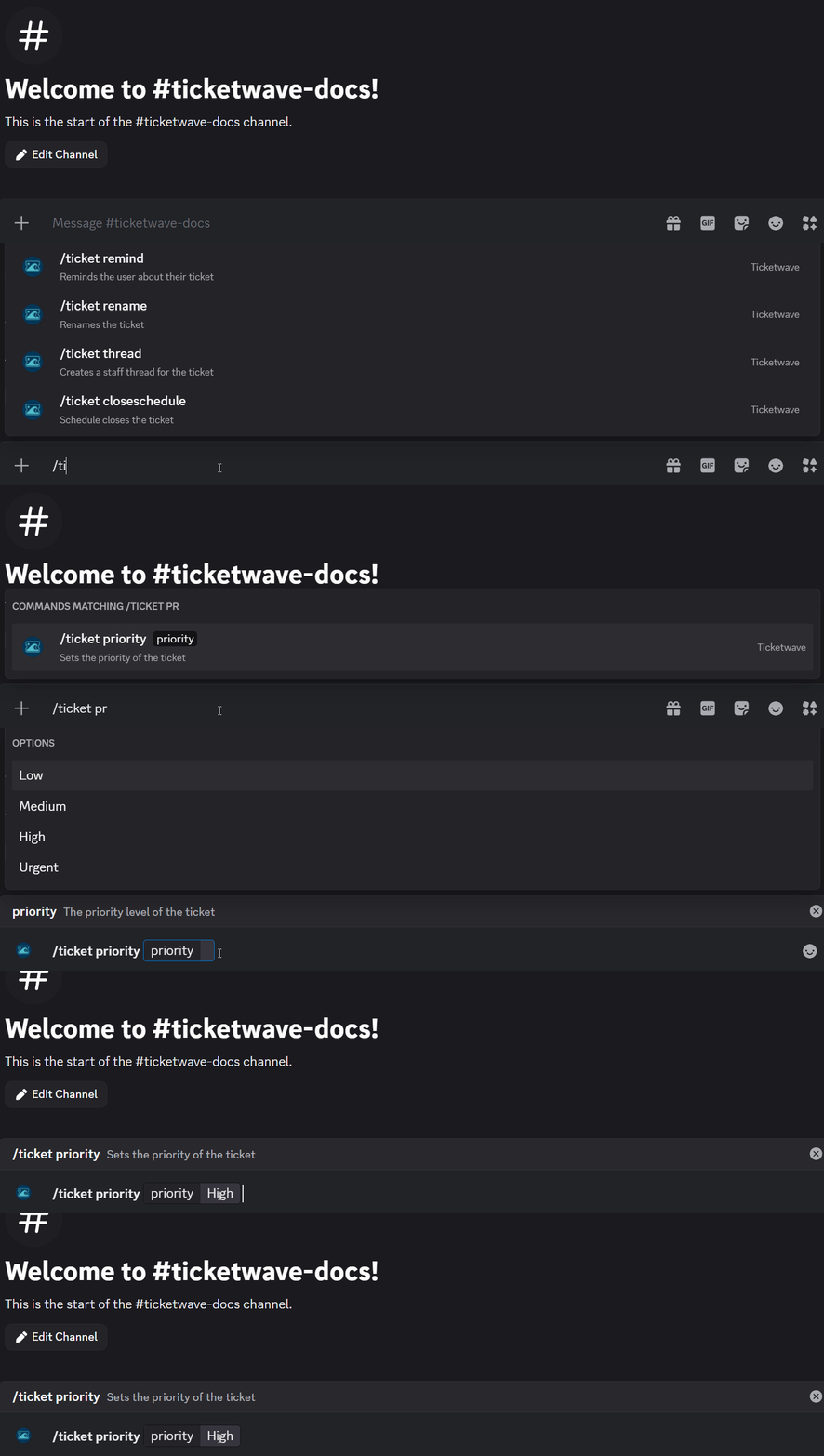
✨ Overview
With /ticket priority, you can:
- 🟢 Set or change the priority level of an existing ticket.
🧾 Command Details
- Type: Slash Command
- Permission Required: Staff
- Usage:
/ticket priority
Parameters
| Parameter | Type | Required | Description |
|---|---|---|---|
priority | Choice | Yes | Priority level |
Priority Levels
| Level | Symbol | When to Use |
|---|---|---|
| Low | 🟢 | 非緊急のリクエスト、一般的な質問 |
| Medium | 🟡 | 標準的なサポートリクエスト、典型的な問題 |
| High | 🟠 | 重要な問題、時間に敏感なリクエスト |
| Urgent | 🔴 | 重大な問題、セキュリティの問題、システムダウン |
💡 When Should You Use This?
Use /ticket priority when:
- 🟢 既存のチケットの優先度レベルを設定または変更して、その緊急性を示したいとき。
Some common scenarios
- チケットが複数のユーザーに影響を与える場合 (🔴 高優先度)
- ユーザーがセキュリティの問題を報告する場合 (🔴 緊急)
- サービスの停止が報告された場合 (🔴 緊急)
- 簡単な質問や機能リクエスト (🟢 低優先度)
- 典型的なサポートリクエスト (🟡 中優先度)
- 顧客のステータスがVIPや「優先サポート」などの優先度を必要とする場合 (🔵 提供される任意の優先度)
📌 Example
/ticket priority
➡️ Szenario 1: Your ticket name pattern is t-{user}-{number} (See placeholders).
A user reports that they is a big security issue in your system. He can easily exploit all user data because of this issue. You want to set the priority of the ticket to "Urgent" to indicate that it needs immediate attention and should be addressed as soon as possible.

The channel name will also be updated:

to

📝 Notes
- ℹ️ 優先度レベルを慎重に設定して、チケットがその緊急性に基づいて適切な順序で対処されるようにしてください。
- ⚠️ チャンネル名は10分間に2回しか変更できません。この制限はDiscordからのものであり、TicketWaveには関連していません。