Ticket Close Command
✨ Overview
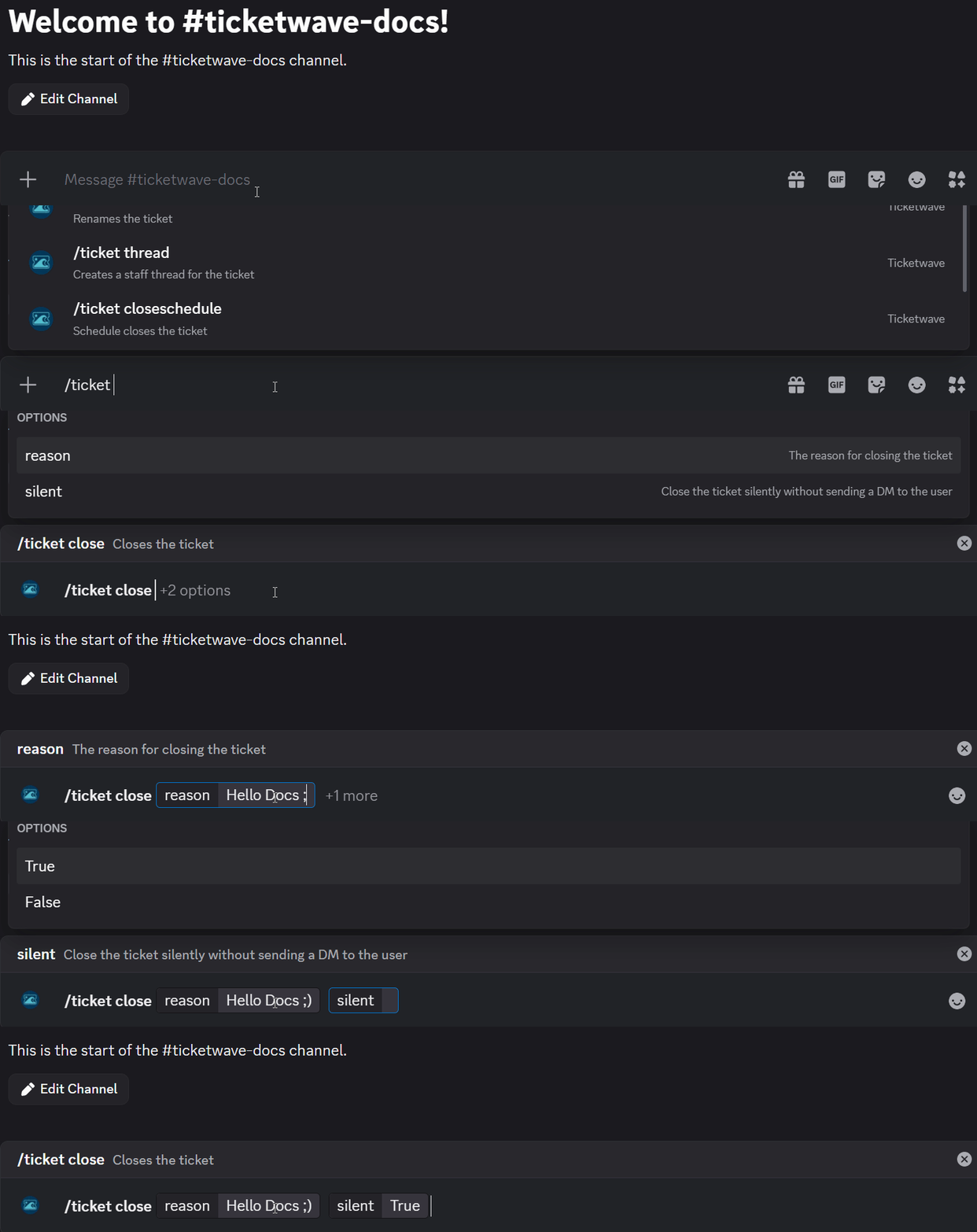
With /ticket close, you can:
- 📁 Close an active existing ticket
🧾 Command Details
- Type: Slash Command
- Permission Required: Everyone (staff can close any ticket, users can only close their own tickets)
- Usage:
/ticket close
Parameters
| Parameter | Type | Required | Description |
|---|---|---|---|
reason | Text | Optional | The reason for closing the ticket |
silent | Boolean | Optional | Whether to close the ticket silently (without notifying the user) |
💡 When Should You Use This?
Use /ticket close when:
- You want to close an active ticket that has been resolved or is no longer needed.
- No further action is needed.
- The problem is no longer relevant.
📌 Example
/ticket close
➡️ Szenario 1: You are a software support team member and escalated a issue (bug) to the development team. The development team has fixed the issue and you want to close the ticket with the information that the issue was fixed in a specific update/patch.

➡️ Szenario 2: You have a user who are extremely annoying but it's too few to ban them. You want to close their ticket without notifying them to avoid further interactions with them.

📝 Notes
- 📁 Closing a ticket will delete the channel and mark as closed.