
Tickets Can't Be Created
A step by step checklist for when members cannot open a ticket in your Discord server.
Guide to Fixing Ticket Creation
"I clicked the button and nothing happened."
It is the most common support request TicketWave server owners get — and it almost always has one of nine causes. This guide walks through them in the exact order TicketWave checks them, so the first failing item is your answer.
Every rejection is sent as an ephemeral message — only the member who clicked sees it. Ask them to send you a screenshot; the message already names the reason.
The Checklist
Are categories available?
If the category system is active but no category is configured, ticket creation stops immediately.
❌ No categories are available.Fix: create at least one category in Settings → Ticket Categories, or disable the category system. See Ticket Categories.
On the free plan only the first 3 categories in the list are used. If all your categories sit below that cut-off, it behaves as if you had none.
Has the member reached their open limit?
Every member may hold a limited number of open tickets.
Fix: close the member's existing ticket, or raise Settings → Ticket System → Ticket Open Limit. Use -1 for unlimited.
Has the server reached the global limit?
There is also a limit for the whole server — 10 open tickets on the free plan, unlimited with premium.
Fix: close resolved tickets, or upgrade. This one hits suddenly at busy times and looks like "the bot is broken".
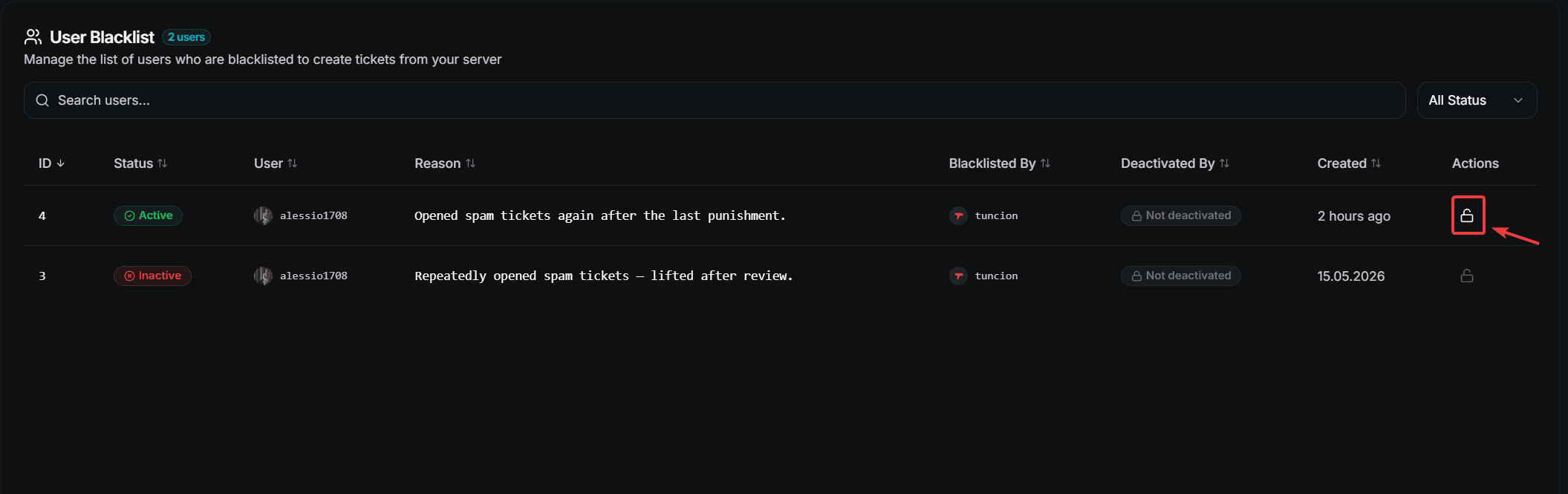
Is the member blacklisted?
Blacklisted members cannot create tickets at all.
Fix: check the Blacklist page of your dashboard and use Unlock User, or the Ticket Blacklist Remove context menu.
Is a cooldown running?
The message names the exact time when the member may try again.
Fix: shorten or remove the cooldown in Settings → Cooldown Durations. Administrators can bypass ticket cooldowns if Admin Cooldown Bypass is enabled.
Is the ticket category still there?
❌ The ticket category is not configured or was deleted.This happens after somebody deletes or recreates the Discord category.
Fix: set a valid Default Ticket Category in Settings → Ticket System, or run /admin setup again.
Is holiday mode blocking?
If holiday mode is enabled with Prevent Ticket Creation, members get your holiday notice instead of a ticket.
Fix: disable the module or fix the period. See Holiday Mode.
If you set only a start or only an end date, the block does not lift by itself. Set both, or turn the module off.
Does the bot have the right permissions?
This is the number one cause on servers that worked yesterday and stopped working today.
TicketWave needs these permissions in the server:
| Permission | Why |
|---|---|
| View Channel | To see the panel and the tickets |
| Manage Channels | To create and delete ticket channels |
| Manage Roles | To set the ticket permissions |
| Send Messages | To post the ticket embeds |
| Read Message History | To build transcripts |
And these inside the ticket category:
| Permission | Why |
|---|---|
| View Channel | To access the category |
| Manage Channels | To create channels in it |
| Send Messages | To post in the new ticket |
| Attach Files | For images and the captcha |
| Read Message History | For transcripts |
Run /admin setup and use the Validate button. It checks the permissions for you and tells you exactly which one is missing.
Is the captcha step failing?
If the Captcha System is enabled, the member has to solve an image captcha before the ticket is created. A wrong answer means no ticket — and the member has to click the panel again.
Fix: nothing is broken. If your community struggles with it, disable the module in Settings → Captcha System. See Limits, Cooldowns & Captcha.
Other Symptoms
The ticket opens but the member cannot write
That is intentional. While ticket steps are still unanswered, the member can read the ticket but not send messages. Sending is unlocked when the last step is answered or skipped.
If a step never appears, check:
- A button step without options is skipped automatically
- An authentication step requires premium
- A step with a category restriction only shows in that category
The panel button does nothing at all
| Cause | Fix |
|---|---|
| The panel was sent before you changed the configuration | Send a fresh panel with /ticket panel |
| The panel links to a category that was deleted | Re-link the button in the Embed Creator |
| The bot is offline | Check /ping and our support server |
Only some members are affected
Almost always a permission overwrite in the ticket category or on a specific role. Compare an affected member with a working one — the difference is usually a role that denies View Channel.
Still Stuck?
Join our support Discord with the exact error message the member received and your server ID. That combination usually gets an answer in a couple of minutes.
Next Steps
- Limits, Cooldowns & Captcha (Understand every check)
- /admin setup (Validate your permissions)
- Reset Server (Start over with clean defaults)
How is this guide?