
Reset Server
Learn how to reset your server settings to default values
Guide to Reset Your Server
In this guide, we will walk you through the process of resetting your server settings to their default values. This is useful if you want to start fresh with default settings.
Reset Your Configuration
Requirements
- You have the TicketWave bot on your server.
- You are the server owner (Only the server owner can execute the reset command).
Making Backups
Please ensure you have saved any important configurations before proceeding with the reset, as this action is irreversible. If you want to lose all current settings, you can skip this step.
Go To Private Text Channel
We highly recommend to use a private text channel to run the reset command. This is to avoid any accidental resets by other members of your server.
Run the Reset Command
In the private text channel, type the following command:
/admin resetPlease see more about this command on our Admin Reset Command Guide to understand what this command does and how it works.
Confirm the Reset
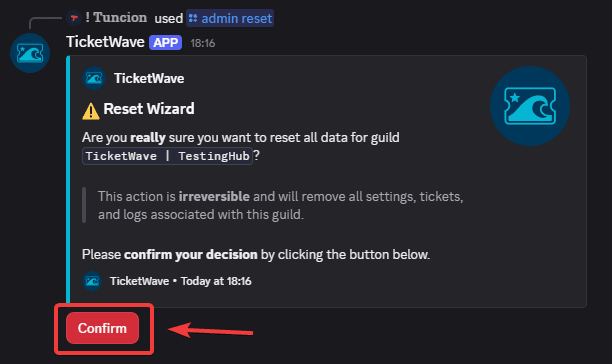
After running the reset command, you will be prompted to confirm the action. Click Confirm to proceed with the reset. Once confirmed, all settings will be deleted and restored to their default values.
Wait for the Reset to Complete
The reset process may take a few moments. Please wait until you receive a confirmation message indicating that the reset has been successfully completed.
Please note that the reset process may take up to 10 minutes to complete, depending on the number of settings and configurations in your server.
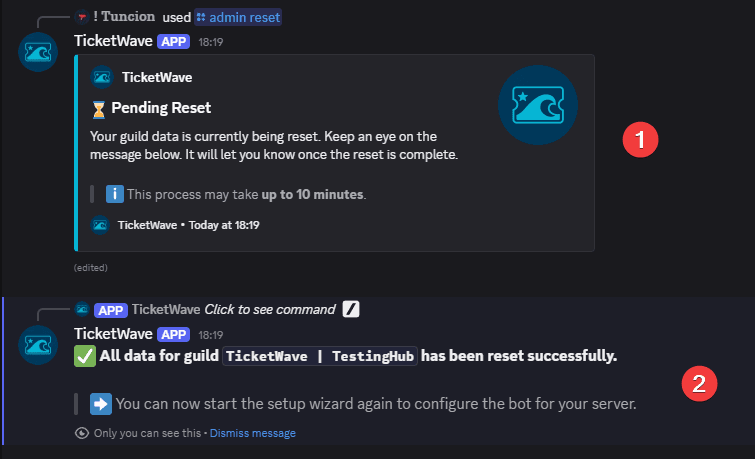
- This is the confirmation message that the reset was started successfully. Please wait for the process to complete.
- You will get the success message once the reset is completed and successfully restored to default values. You can now start configuring your server settings from scratch.
To configurate your server you could use our Setup Command Guide to help you with the setup process.
Next Steps
Now that you could explore our bot with all features we offer. Here are some recommended next steps:
- All Commands (Explore all commands available for your server and learn how to use them effectively)
- All Context Menus (Explore all context menus available for your server and learn how to use them effectively)
How is this guide?