
/ticket priority
Set the priority level of a ticket to indicate its urgency.
Ticket Priority Command
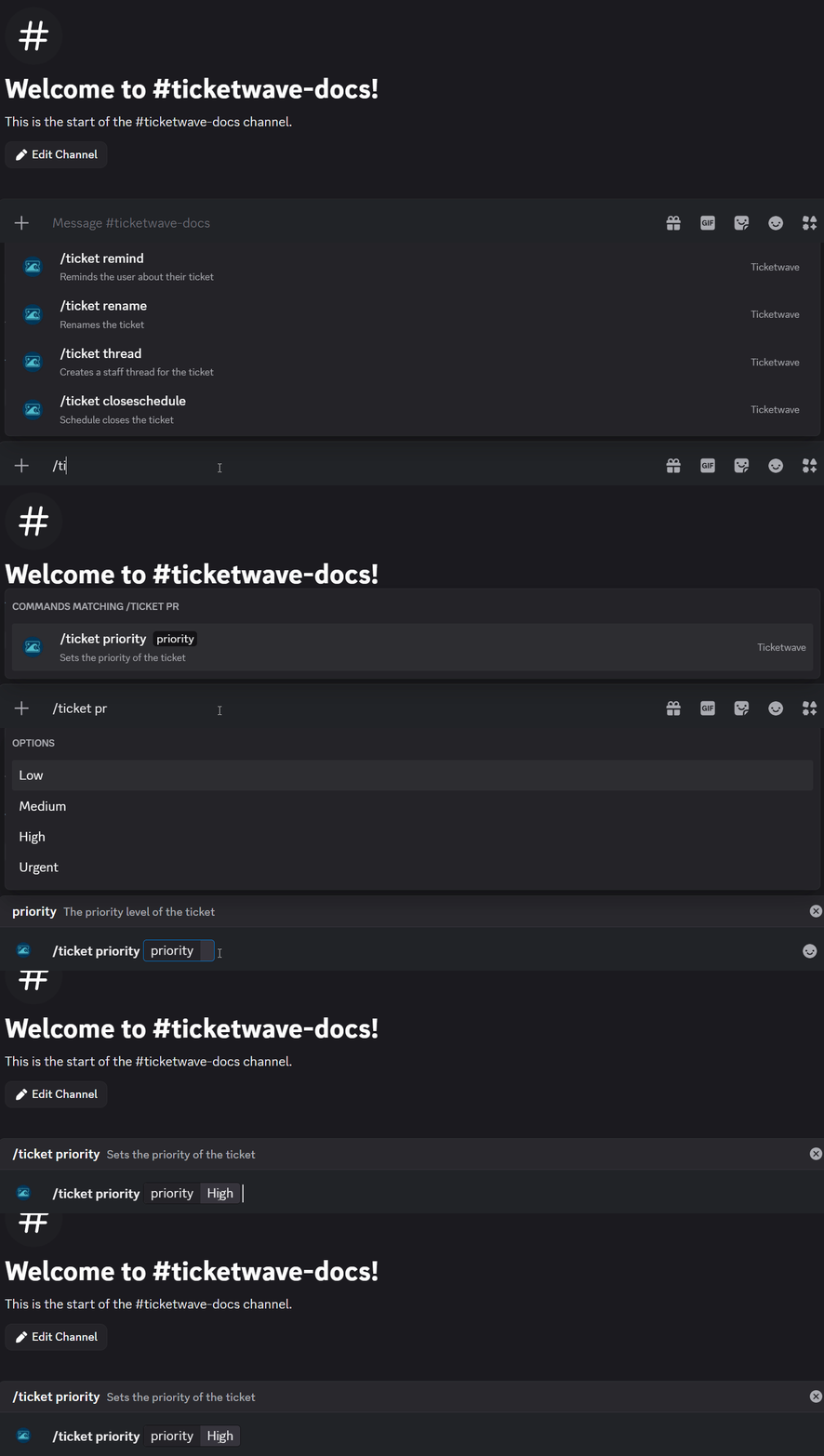
The /ticket priority command sets the priority level of a ticket. The ticket channel name is updated automatically to reflect the new priority, making it easy to spot urgent tickets at a glance.
Usage
/ticket priorityParameters
| Parameter | Type | Required | Description |
|---|---|---|---|
priority | Choice | Yes | The priority level to assign |
Priority Levels
| Level | Symbol | When to Use |
|---|---|---|
| Low | 🟢 | General questions, non-urgent requests |
| Medium | 🟡 | Standard support requests |
| High | 🟠 | Time-sensitive issues affecting the user |
| Urgent | 🔴 | Critical problems, security issues, service outages |
When to Use This
Use /ticket priority when a ticket needs to be triaged — for example when a user reports a security vulnerability, a service outage, or a critical issue affecting multiple users.
Example
A user reports a critical security vulnerability. You set the priority to Urgent so it stands out immediately:

The channel name updates automatically to reflect the priority:


Notes
- Use priority levels thoughtfully to keep your team focused on what matters most.
- Discord limits channel renames to 2 times per 10 minutes. This applies to both
/ticket priorityand/ticket rename.
How is this guide?